
What's for dinner?
Ask your fridge
An ingredient manager that ranks dishes you can make right now from what you have at home, and gives you a heads-up before ingredients expire.
What it does
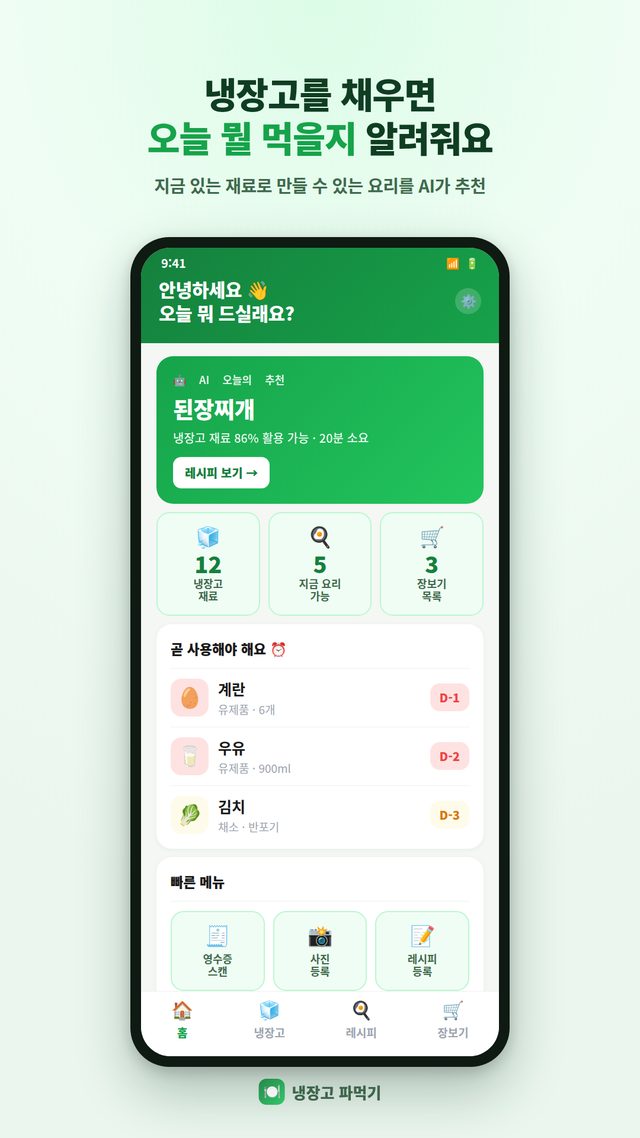
We all ask “What should I cook today?” — and still end up tossing vegetables that wilted in the back of the fridge. Fridge Chef was made to fix exactly that. Add the ingredients you have, and it suggests dishes you can make right now, ranked by match, and reminds you every morning about ingredients nearing their expiration date. No sign-up needed: ingredient tracking and recipe matching all run on your device.
Key features
- Recipe suggestions from what you have — 7,000+ recipes ranked by match, with missing ingredients shown
- Snap a receipt once to add items and prices automatically (on-device Korean text recognition)
- Expiration countdowns — a reminder at 8 AM every day about items expiring soon
- Shopping list — add missing ingredients and check them off at the store
- Home screen widget — see expiring items and today's suggested dish without opening the app
- Share fridge ingredients with family or roommates, plus full data backup and restore
- Everything runs on your device with no sign-up or login — your ingredients and photos never leave it
Latest update · Oct 2026
- 7,000+ recipes — Korean, Western, Chinese, Japanese, vegan, vegetarian and baby food categories, with new recipes added automatically without an app update
- New freezer section — freezing extends the expiration date, and thawing shortens it accordingly
- Excluded ingredients — add allergens or foods you dislike and they're removed from suggestions, lists and widgets all at once
- Cooking log — shows “Made it N times,” and dishes you made recently take a short break from suggestions
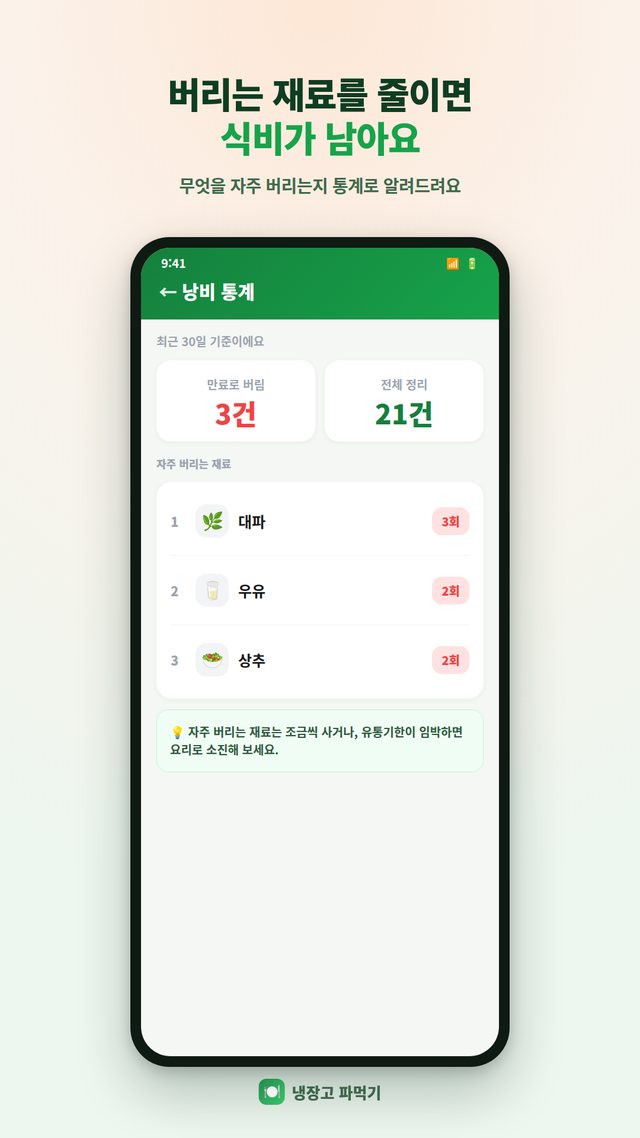
- Eaten / Thrown out — note why when you clear items, so you waste less food
- Recipe search — finds recipes containing all words, and “-word” excludes a word
FAQ
Frequently asked questions
Do I have to enter every ingredient by hand?
Snap a photo of your grocery receipt and the app recognizes and adds the items and prices automatically. Korean text recognition runs on your device, so it's fast and needs no internet connection. You can also enter items by hand.
How does it decide which dishes to suggest?
It looks at the ingredients you've added as fridge, pantry or seasoning items, finds recipes you can make, and calculates a match rate showing how much of each recipe your ingredients cover. Dishes you can make right now appear at the top, and it also tells you which ingredients you're missing.
How are expiration dates managed?
Add an expiration date for each ingredient and see it at a glance as a countdown. Items expiring soon are marked red or orange, and every morning at 8 AM you get a reminder if anything is about to expire.
Can I use it for grocery shopping?
Add missing ingredients to your shopping list and check them off one by one at the store. With the home screen widget, you can see expiring items and today's suggested dish without opening the app.
Can I use it with my family?
You can export your fridge ingredients as a file and share it with family or roommates. It merges into the recipient's existing list, which makes it easy to manage groceries together with the people you live with. Save all your data to a backup file and you can restore everything after switching phones or reinstalling the app.
Do I need an internet connection?
Not for managing ingredients or getting recipe suggestions. There's no sign-up or login, and everything from receipt recognition to recipe matching and reminders runs on your device, so it works in airplane mode or without data. When you're online, the app only downloads the recipe list when new recipes are available; your ingredient data and photos are never sent to an external server.
Can I exclude ingredients I'm allergic to or don't like?
Yes. Add excluded ingredients in Settings, and recipes containing them are removed from today's suggestions, the recipe list, the count of dishes you can make, and the home screen widget all at once. In recipe search, put a minus sign in front of an ingredient, like “-cucumber,” to leave out dishes that contain it.
Does it track ingredients in the freezer?
Yes, the freezer is one of the storage locations. Move an item to the freezer and its expiration date is extended based on the type of food; take it out to thaw and the date is shortened accordingly. Items that have already expired stay as they are, so their dates are never extended by mistake.
More apps
Explore other apps
FamilyKeeper
Family location & safety
PocketStock
Stocks: track, manage, forecast
Yeojeong
Itinerary, spending, photos & diary
MeetingNote
Write on PDFs while recording
 MyHomeCam
Your old phone becomes a home CCTV
 Life Toolkit
20 everyday tools in one app
 VISITED
A fog map cleared by walking
 Money Note
Budget filled in from bank alerts
 PenCut
A vertical video in 3 minutes
 Play Together
31 mini-games with family & friends
MyHomeCam
Your old phone becomes a home CCTV
Life Toolkit
20 everyday tools in one app
VISITED
A fog map cleared by walking
Money Note
Budget filled in from bank alerts
PenCut
A vertical video in 3 minutes
Play Together
31 mini-games with family & friends
Privacy
Fridge Chef requires no sign-up and no external data connections — the information you enter is stored safely on your device only.