
No need to log every purchase —
your budget fills itself in
Money Note automatically reads notifications from bank apps like KakaoBank, KB Kookmin Bank and Shinhan Bank to record your income and spending. Add returns and trends for your savings, pension, funds, stocks and real estate, and see clearly in one app how much you earned, spent and saved each month.
About the app
Most budgets fail for one reason — you have to enter everything by hand. Money Note reads the bank app notifications already on your phone and fills in your budget for you. No account linking, no digital certificates, no bank logins. It combines asset management and statistics in one app while staying light with no unnecessary features, and all the financial data you enter is never sent to a server — it stays on this phone.
- Reads notifications from major bank apps like KakaoBank · KB Kookmin Bank · Shinhan Bank and fills in transactions automatically
- Cuts down tedious manual entry, and you can still edit or delete any entry added automatically
- Never asks for bank account details or certificates — it only reads the notification text
- Record transactions as one of three types: income · expense · savings (investment)
- Understand your spending patterns with 16 expense categories such as food · transport · shopping · medical · housing, and 5 income categories such as salary · interest · refunds
- Fixed expenses are marked separately, so recurring monthly costs stand out at a glance
- Register and track six asset types: savings · pension · funds · stocks · real estate · other
- Return rate and profit are calculated automatically from current value vs. principal
- Record monthly valuations and see how your assets have changed on a trend graph
- Get reminders ahead of time when an asset's maturity date is approaching
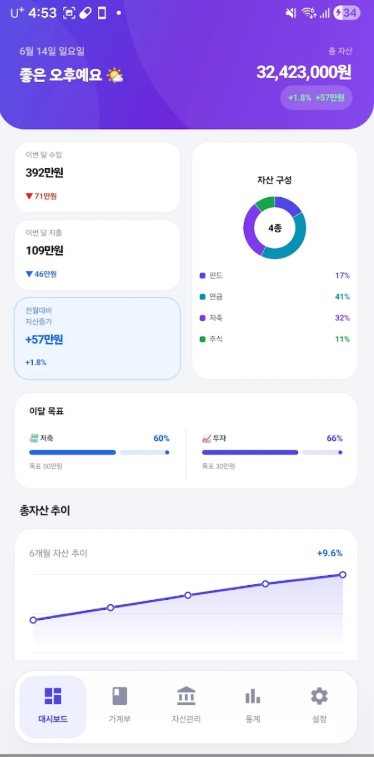
- This month's income and spending summary, total assets and change vs. last month on one screen
- Asset mix as a donut chart, 6-month total asset trend as a line graph
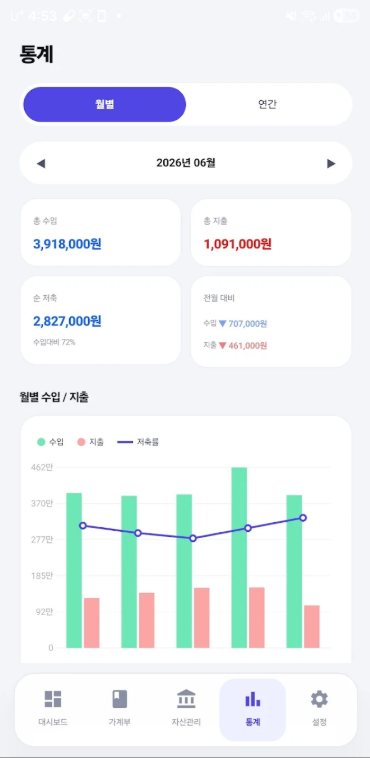
- Charts for monthly and yearly income/spending, savings rate trend and spending by category
- Check savings and investment goal progress with progress bars
- All the financial data you enter is stored only on your device, never sent to an internet server
- Export or import a JSON backup file anytime to prepare for a new phone or restore your data
- No sign-up, no login required
Frequently asked questions
Do I need to link a bank account or register a certificate?
Which banks' notifications does it read?
What kinds of assets can I manage?
Does my financial data leave my phone?
Can I move my records to a new phone?
Are there in-app purchases or subscriptions?
Explore other apps
 Fridge Chef
Recipes from what’s in your fridge
 MyHomeCam
Your old phone becomes a home CCTV
 Life Toolkit
20 everyday tools in one app
 VISITED
A fog map cleared by walking
 PenCut
A vertical video in 3 minutes
 Play Together
31 mini-games with family & friends