
All those separate apps?
Now you only need one
Measuring a room, leveling a picture frame, checking noise from next door, reading tiny print — you no longer need a separate app for each. 20 everyday tools in one app, with no sign-up.
What it does
Measuring a room, hanging a picture frame straight, dealing with loud neighbors, reading the tiny print on a pharmacy bag — install a different app each time and your home screen quickly fills up with icons. Life Toolkit brings together 20 measuring, everyday and calculation tools for exactly these moments. No account and no login — install it and start using it right away. Your measurements, photos and videos are stored only on this phone.
Measure
- Noise meter — real-time decibels and 1-minute equivalent sound level (Leq) compared with daytime and nighttime standards, with video evidence recording and CSV export
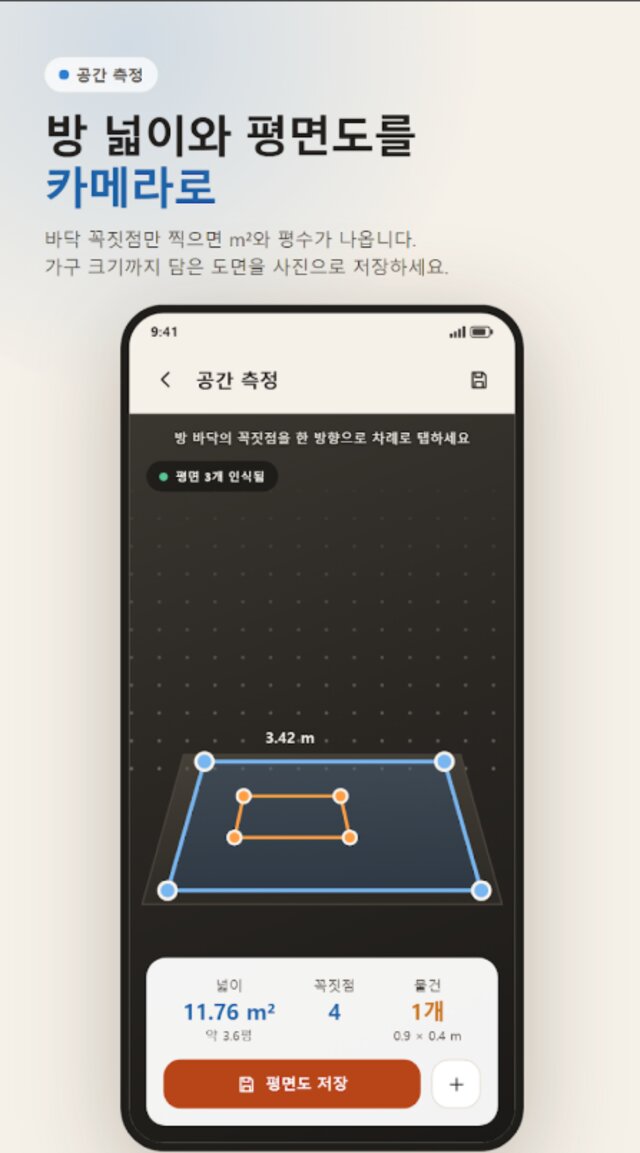
- Room measurement — tap the floor corners to calculate area (㎡ and pyeong) automatically, and save a floor plan with furniture as an image
- Length, height and distance — measure objects, a person's height, or width, depth and height with the camera
- Compass · bubble level · metal detector (ferrous metal) — one app instead of three just to hang a shelf
Everyday
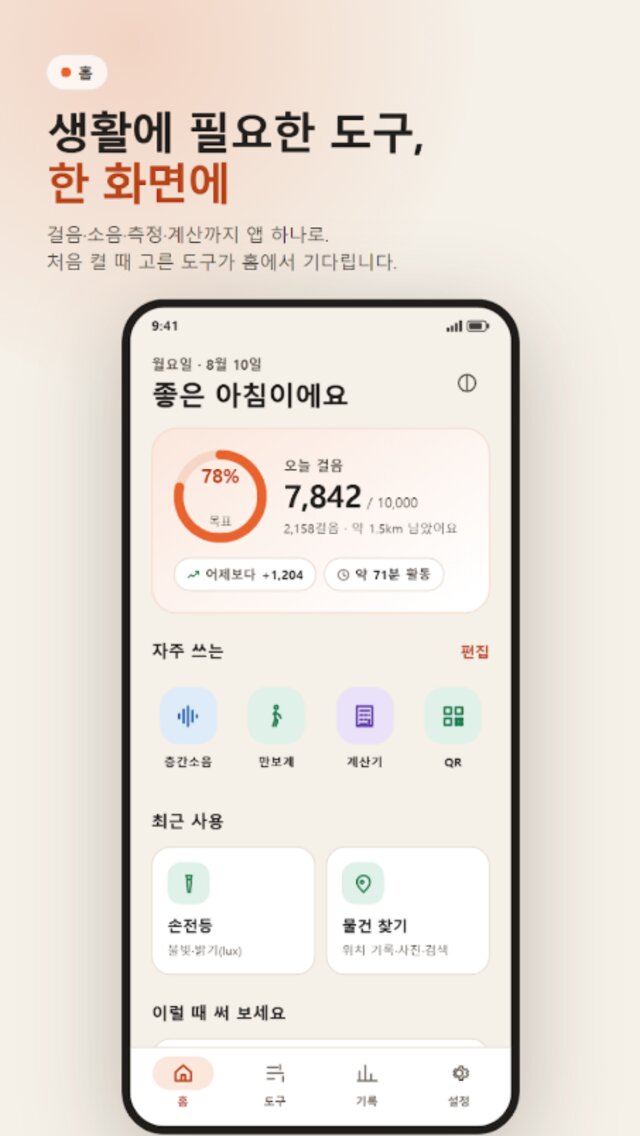
- Pedometer — steps, distance and calories on a ring gauge, keeps counting even when the app is closed, and includes watch steps via Health Connect
- Timer · stopwatch — an alarm-based timer that rings on time even with the screen off, plus stopwatch lap records
- Flashlight · light meter — a flashlight that also measures brightness (lux) in real time
- Magnifier · document text reading — enlarge text from a single photo or have it read aloud (handy for tiny print on pharmacy bags and contracts)
- Mirror — front camera zoom and left-right flip
- Hidden camera detector — New · shine a light and it circles spots where a lens reflects it back, plus a red filter, infrared mode (front or rear camera), magnetic field sensor, scans for suspected cameras on the same Wi-Fi and Bluetooth devices, and a checklist of common hiding spots
- Item finder — record where you put things with a photo and location, then search by name
- QR · barcode scanner — scan, open and copy
Calculate · Records
- Calculator — evaluates expressions with parentheses and operator precedence, plus a scientific keypad (trig functions, logs, powers)
- Unit converter — length, weight, temperature and even traditional units
- Date calculator — age, countdowns and anniversaries, pinnable with a home screen widget
- Records · statistics — step and noise data build up into weekly graphs and summaries, with a home screen widget for steps
Latest update · v1.3.0
- New tool: Hidden camera detector — helps narrow down suspicious spots in lodging, restrooms and changing rooms
- Chinese (Simplified and Traditional) and Japanese support — 5 languages including Korean and English
- Improved display when the language chosen in Settings differs from the phone's language
FAQ
Frequently asked questions
Do I need to sign up or log in?
No. You can use it right away without an account, and all measurement data, photos and videos are stored only on this phone. Nothing is uploaded to a server, and you can delete all stored data at once in Settings → Privacy.
Do I need an internet connection?
No. The internet is used in only two cases: checking for a new version, and downloading the text recognition pack the first time you use document reading. After that, every feature works offline, and in neither case is your data sent out.
How does room measurement work?
Tap the floor corners with the camera in order, going one direction, and the area (㎡ and pyeong) is calculated automatically. You can mark furniture as rectangles and save the floor plan as an image. Requires a device that supports ARCore.
Can I use the noise readings as legal evidence?
You can check real-time decibels and the 1-minute equivalent sound level (Leq) against daytime and nighttime standards and record video, but a phone sensor is not professional measuring equipment and is for reference only. For formal disputes, we recommend data from a professional measurement agency as legal evidence.
Can the metal detector find rebar or pipes in a wall?
It only detects ferrous metal. Wood studs, PVC pipes, copper wiring and aluminum are not detected, so always double-check another way before drilling into a wall.
Are there in-app purchases?
No account and no in-app purchases — every feature is available as is. It supports light and dark themes and Korean, English, Japanese and Chinese (Simplified and Traditional), and with TalkBack you can hear noise levels, whether something is level, step goal progress and more.
How does hidden camera detection work?
Turn on the light and point it around: the app circles tiny reflection spots bounced back by a lens. A red filter makes reflections stand out more, infrared mode (front or rear camera) reveals night-vision camera lights, and the magnetic field sensor checks objects hiding electronic parts. It also finds devices on the same Wi-Fi with video streaming ports open, camera-like Wi-Fi names and Bluetooth devices, and includes a checklist of common hiding spots. The camera view is analyzed only on your phone and never saved. It's a helper tool for narrowing down suspicious spots, so it may miss some cameras, such as ones that are turned off or deeply hidden.
More apps
Explore other apps
FamilyKeeper
Family location & safety
PocketStock
Stocks: track, manage, forecast
Yeojeong
Itinerary, spending, photos & diary
MeetingNote
Write on PDFs while recording
 Fridge Chef
Recipes from what’s in your fridge
 MyHomeCam
Your old phone becomes a home CCTV
 VISITED
A fog map cleared by walking
 Money Note
Budget filled in from bank alerts
 PenCut
A vertical video in 3 minutes
 Play Together
31 mini-games with family & friends
Fridge Chef
Recipes from what’s in your fridge
MyHomeCam
Your old phone becomes a home CCTV
VISITED
A fog map cleared by walking
Money Note
Budget filled in from bank alerts
PenCut
A vertical video in 3 minutes
Play Together
31 mini-games with family & friends
Privacy
Life Toolkit requires no sign-up or login — your measurement data, photos and videos are stored and managed only on this device. The internet is used only to check for updates and download the text recognition pack, and your data is never sent to a server.