Know where your child is,
right now
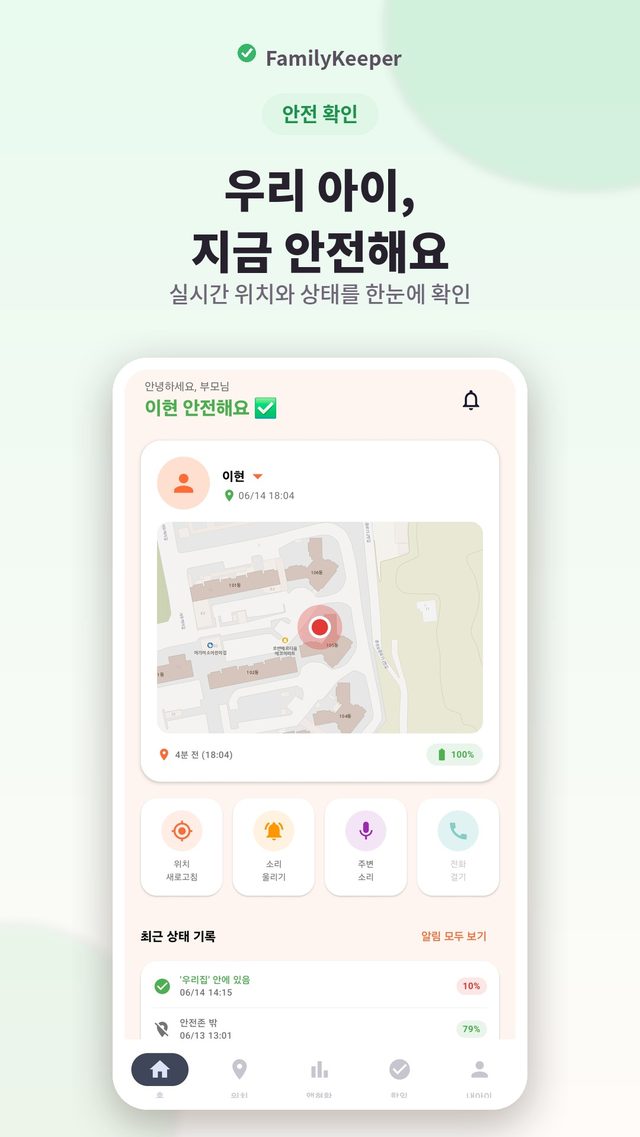
A family safety app that lets you check in real time that your child is safe — on the way to school, at after-school classes, or out with friends — even when you can't be with them.
About the app
FamilyKeeper is a family safety monitoring app that lets parents safely keep track of their children's location and daily routine. Whether your child is heading to school, at an after-school class, or out and about, you can check in real time that they're safe and have peace of mind. You can add multiple children to one parent's phone and manage them all in one place.
Key features
- Real-time location tracking — see routes and places visited on a map
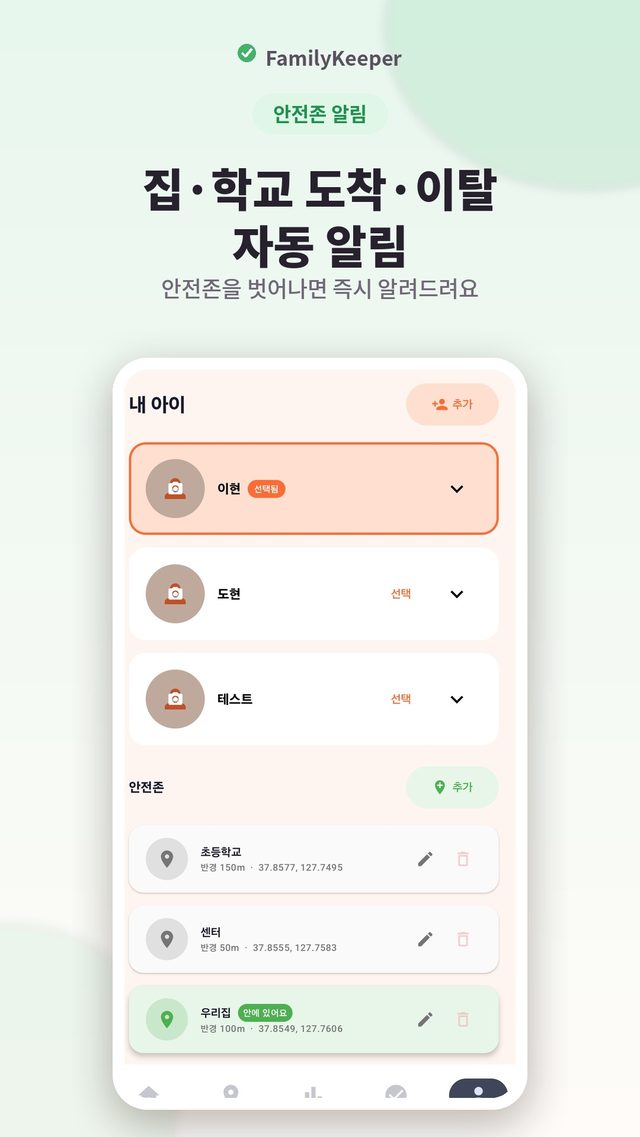
- Safe zone alerts — automatic alerts when your child arrives at or leaves home, school and more
- SOS emergency alert — one tap on the home screen widget sends their location instantly
- Ambient sound check — a short listen only on request, deleted immediately and never saved
- App usage overview — see screen time and apps used to build healthy habits
- Connection and battery alerts with PIN-protected uninstall
Latest update · Oct 2026
- School arrival check — set days and an arrival deadline for school or after-school safe zones, and get notified of on-time arrival, late arrival, or no confirmed arrival (on both Mom's and Dad's phones)
- Disconnection cause — see right on the home screen whether it's because the phone was powered off, the battery died, airplane mode, or battery optimization/power saving
- Daily route timeline — places your child stayed 10+ minutes and how long, labeled with safe zone names or addresses; tap to jump to that spot on the map
- Child check-in — your child can send “I'm here · Running late · Please pick me up” from a widget in one tap
FAQ
Frequently asked questions
How much of my child's location can I see?
Beyond their current location, you can see their route and the places they stopped on a map. Where they are now and how they got there are all on one screen.
Will I know right away when my child gets to school or home?
Yes. Set frequently visited places like home and school as safe zones, and you'll get an automatic alert when your child arrives or leaves. No need to check manually every time.
Can I use it with more than one child?
Yes. You can add multiple children to one parent's phone and manage them all in one place.
Does the ambient sound check save recordings?
No. It only listens briefly when a parent requests it, and the audio is deleted immediately without being saved.
What if my child deletes the app?
PIN-protected uninstall prevents the app from being removed without permission. You'll also get alerts when the connection drops or the battery runs low.
What happens in an emergency?
When your child taps SOS on the home screen widget, their location is sent to you instantly. It works with a single tap — no need to open the app and look for it.
Will I be notified if my child doesn't reach school by a set time?
Yes. In School arrival check, set a safe zone (school, after-school class, etc.), the days, a start time and an arrival deadline. You'll be told whether your child arrived on time, arrived late, or still hasn't been confirmed as arrived after the deadline. The check is based on time, so it works even if your child's phone is off, and every linked parent phone gets the same alert.
If my child's phone disconnects, can I find out why?
When the connection drops, the app shows the most likely cause: powered off, battery dead, airplane mode, battery optimization, or power saving mode. If the phone is still connected but location permission or GPS is turned off, you'll see a warning on the home screen.
Can my child let me know they've arrived?
When your child taps “I'm here,” “Running late,” or “Please pick me up” on the check-in widget or the child screen, you get a notification on your phone along with their location at that moment. If they're inside a safe zone, the place name is shown too.
More apps
Explore other apps
PocketStock
Stocks: track, manage, forecast
Yeojeong
Itinerary, spending, photos & diary
MeetingNote
Write on PDFs while recording
 Fridge Chef
Recipes from what’s in your fridge
 MyHomeCam
Your old phone becomes a home CCTV
 Life Toolkit
20 everyday tools in one app
 VISITED
A fog map cleared by walking
 Money Note
Budget filled in from bank alerts
 PenCut
A vertical video in 3 minutes
 Play Together
31 mini-games with family & friends
Fridge Chef
Recipes from what’s in your fridge
MyHomeCam
Your old phone becomes a home CCTV
Life Toolkit
20 everyday tools in one app
VISITED
A fog map cleared by walking
Money Note
Budget filled in from bank alerts
PenCut
A vertical video in 3 minutes
Play Together
31 mini-games with family & friends
Privacy
FamilyKeeper uses location data to help keep your child safe. Ambient sound is checked briefly only on request and deleted immediately without being saved.